Clearing Procedures for the M16 Series Weapon
The first step in maintenance is to clear the weapon. This applies in all situations, not just after firing.
This paragraph explains the techniques and procedures for clearing the M16-/M4-series weapon. Additional mechanical training is available in TM 9-1005-319-10 to include disassembly, maintenance, assembly, loading, and sight manipulation.
WARNING: To be considered SAFE before disassembly, cleaning, inspecting, transporting, or storing, the weapon must be cleared.
NOTE: Get a buddy to witness and verify all steps of clearing procedures.
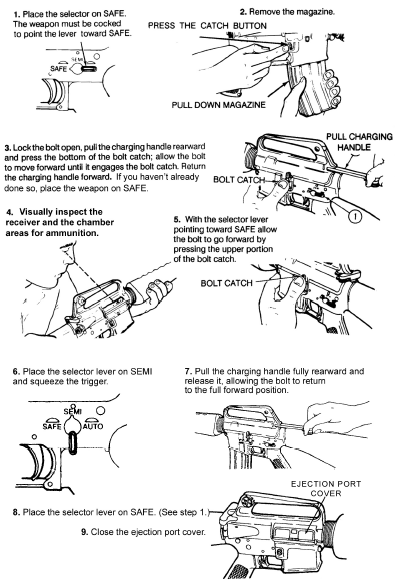
- Point the muzzle in a designated SAFE DIRECTION. Attempt to place selector lever on SAFE. If weapon is not cocked, lever cannot be placed on SAFE.
- Remove the magazine by depressing the magazine catch button and pulling the magazine down.
- To lock bolt open, pull charging handle rearward. Press bottom of bolt catch and allow bolt to move forward until it engages bolt catch. Return charging handle to full forward position. If you have not done so before, place the selector lever on SAFE.
- Visually (not physically) inspect the receiver and chamber to ensure these areas contain no ammo.
- With the selector lever pointing toward SAFE, allow the bolt to go forward by pressing the upper portion of the bolt catch.
- Place the selector lever on SEMI and squeeze the trigger.
- Pull the charging handle fully rearward and release it, allowing the bolt to return to the full forward position.
- Place the selector lever on SAFE.
- Close the ejection port cover.
NOTE: If the rifle will not be fired, immediately close the ejection port cover.
Recently Added
Latest articles in M16
Available Subcategories :
| Physical Security | M203 | M240B | M249 | M4 | M60 | M72 | M9 | Maintenance | Military Justice | MK19 | NCO Duties. Responsibilities, Authorities | NCO History | NCOER | M2 | Physical Training | Promotions and Reductions | Security and Intelligence | Supply Economy | Survival | The Army Plan | Training the Force | Uniforms | U.S. Constitution | Weight Control | Study Guide Files | Drill and Ceremony | Army Programs | AT4 | Awards and Decorations | Battle Focused Training | Camo and Concealment | CBRN | Chain of Command | Code of Conduct | Communications | Counseling | Customs and courtesies | Desert Operations | Army History | Field Sanitation | First Aid | Flags | Geneva Convention | Guard Duty | Hand Grenades | Land Navigation | Leadership | Leaves and Passes | M11 | M16 | M18A1 |

